Demo
A MyVector session from start to finish, replayed in your browser. It starts the published MySQL 9.7 component image, loads the 50,000 most common English words as 50-dimensional vectors, builds an HNSW index, and searches it. It checks the results against an exact search, inserts a row to show the index updating online, and restarts MySQL to show the index loading from disk.
Every command in the recording ran for real in a live container. The typing is simulated, and long waits (the first start, loading the words) are shortened. Use the markers on the progress bar to jump to a chapter.
Download the recording to play it in a
terminal with asciinema play myvector-demo.cast.
Run it yourself
From a clone of the repository (the word vectors are in
examples/stanford50d):
docker run -d --name myvector-demo -e MYSQL_ROOT_PASSWORD=myvector -e MYSQL_DATABASE=demo \
    -v $PWD/scripts/demo/00-myvector-cnf.sh:/docker-entrypoint-initdb.d/00-myvector-cnf.sh:ro \
    ghcr.io/askdba/myvector:mysql9.7-component
scripts/demo/00-myvector-cnf.sh writes myvector.cnf into the data directory
before the image installs the component. The component reads it to connect
back to MySQL for index builds and for online updates. It reuses the root
password, which is fine for a local demo only; see
Online Index Updates for a dedicated user.
Wait about 30 seconds for the first start, then connect with
docker exec -it myvector-demo mysql -uroot -pmyvector demo and create the
table:
CREATE TABLE words50d (
  wordid  INT AUTO_INCREMENT PRIMARY KEY,
  word    VARCHAR(200),
  wordvec VARBINARY(208) COMMENT
    'MYVECTOR COLUMN type=HNSW,dim=50,size=100000,M=32,ef=100,dist=L2,online=Y,idcol=wordid'
);
Load the words from the shell, then build the index:
(zcat examples/stanford50d/insert50d.sql.gz | head -n 50001; echo 'COMMIT;') \
    | docker exec -i myvector-demo mysql -uroot -pmyvector demo
CALL mysql.myvector_index_build('demo.words50d.wordvec', 'wordid');
CALL mysql.myvector_index_status('demo.words50d.wordvec')\G
Turn on online updates: after the build, reinstall the component and load the saved index into the new instance (the note below explains why):
UNINSTALL COMPONENT 'file://myvector';
INSTALL COMPONENT 'file://myvector';
CALL mysql.myvector_index_load('demo.words50d.wordvec');
Search. myvector_ann_set() searches the index and returns the ids of the
nearest rows as a JSON array. JSON_TABLE turns the array into rows to join
back to the table:
SET @q = (SELECT wordvec FROM words50d WHERE word = 'school');
SET @ids = myvector_ann_set('demo.words50d.wordvec', 'wordid', @q, 'nn=8');

SELECT w.word, ROUND(myvector_distance(w.wordvec, @q, 'L2'), 3) AS distance
FROM JSON_TABLE(@ids, '$[*]' COLUMNS (id BIGINT PATH '$')) ids
JOIN words50d w ON w.wordid = ids.id ORDER BY distance;
The join looks up each id by primary key. Simpler forms such as
WHERE wordid MEMBER OF (@ids) read the whole table, which here is slower than
an exact search.
Insert a row and search again: with online=Y the new row shows up after a
moment, without a rebuild. After a restart, load the saved index with
CALL mysql.myvector_index_load('demo.words50d.wordvec');. When you are done,
remove the container with docker rm -f myvector-demo.
Component images up to v1.26.9
The published component images (v1.26.9 and earlier) differ from the plugin images and from newer builds. The demo works around this:
- The vector column is declared with a
MYVECTOR COLUMNcomment. TheMYVECTOR(...)column type is not available on these images. - Searches call
myvector_ann_set().WHERE MYVECTOR_IS_ANN(...)needs a plugin image or a component build that includes #156; see Usage & API. - The binlog listener for online updates only starts if the component is installed while MySQL accepts TCP connections. The image installs it during first-start initialization, when it doesn't, and MySQL loads it at every restart before it does. Reinstall the component once the server is up, as above, or online updates stay off.
- Only INSERTs are applied online. A DELETE or UPDATE does not change the index, so the search can still return a deleted row's id, or rank a row by its old vector. Rebuild the index after them.
- Run
myvector_index_buildbefore the reinstall, while the listener is off. Building anonline=Yindex while the listener runs crashed the server in our tests.
To re-record the demo, for example for a new image, run
python3 scripts/record-demo.py --image <image>. It writes
docs/assets/demo/myvector-demo.cast.
Movie Finder app: a million real movies
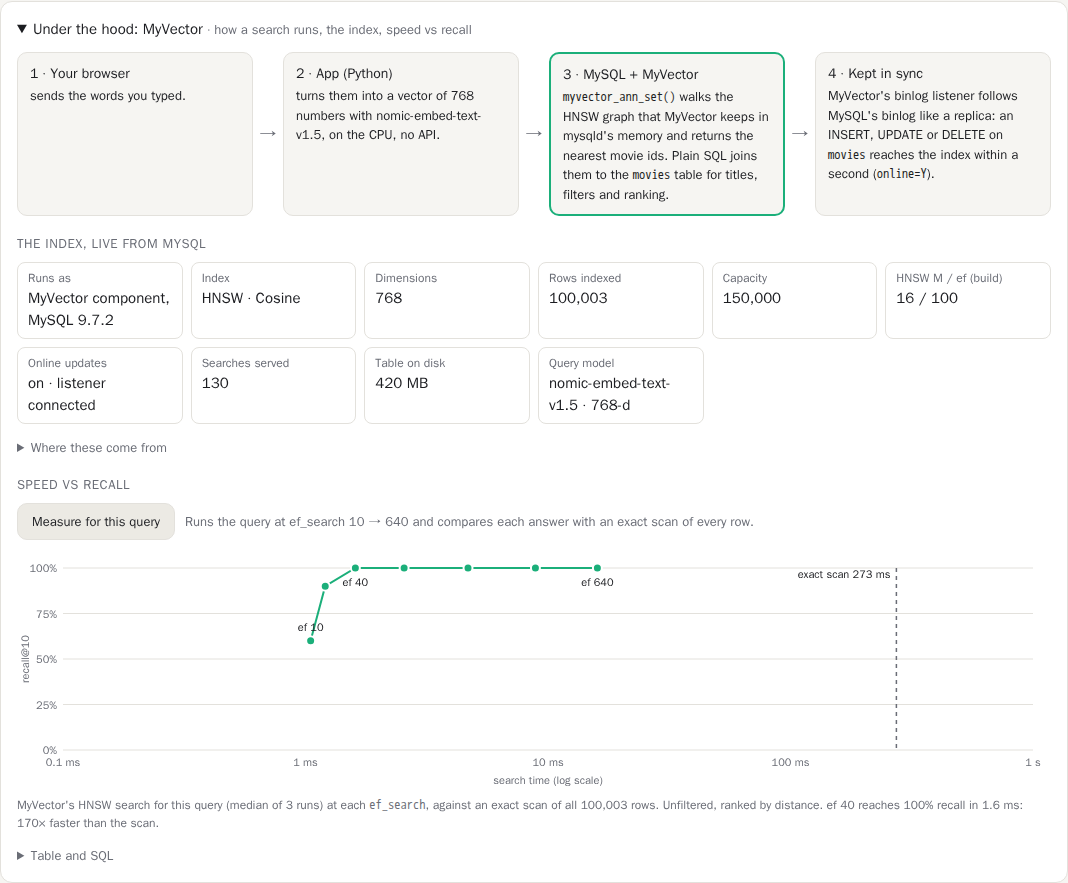
A web app that searches about a million movies by meaning, with the vector search inside MySQL through MyVector. You describe a movie in your own words ("a heist that goes wrong in a snowy town"). The app embeds the text and asks MySQL for the nearest films.
What it shows:
- Hybrid search: genre, year, rating and language filters, combined with the vector
search in SQL. The page says which filtered-search path ran (a key list, or
MYVECTOR_ANN_FILTERED) and why. - More like this, from a film's stored vector, in pure SQL.
- HNSW vs exact: both searches side by side, with the speed difference and recall.
- Online updates: add a movie and it is searchable within a second, with no index
rebuild (
online=Y). - Under the hood: how a search flows through MyVector, the live index details from
MYVECTOR_INDEX_STATUS, where each query's time goes, and a speed-vs-recall chart overef_search. Every result also shows the SQL that ran.
Run it from a clone of the repository:
The first start downloads the movie data (about 7 GB, once). MOVIES=10k, 100k (the
default) or full (all 1,035,695 movies) picks how many films to load. The app needs
features that are newer than the v1.26.9 images; until a release includes them, its
README shows how to build a local image. See
examples/movie-finder
for the details, timings and licensing: the movie data comes from TMDB, is downloaded on
your machine, and is not part of MyVector.
Large dataset: Amazon product catalog
A bigger example: load a real-world product catalog (from Amazon) into a MySQL
database, build an HNSW index and then perform vector search to find
semantically relevant results. This walkthrough uses the plugin syntax
(MYVECTOR(...) column type and MYVECTOR_IS_ANN), so run it on a plugin image
such as ghcr.io/askdba/myvector:mysql8.4.
Dataset Source : https://www.kaggle.com/datasets/piyushjain16/amazon-product-data
Rows : 2000000 (2 Million)
Embeddings : 768 Dimension using SentenceTransformer model all-mpnet-base-v2
https://huggingface.co/sentence-transformers/all-mpnet-base-v2
- Create the table using the following SQL statement
Please review the following parameters : M, ef, threads in the MYVECTOR
column specification. On our benchmark VM, it took 2 minutes to create the
vector index with the following parameters : M=64,ef=128,threads=48.
That's right, only 2 minutes! The SQL script below has threads=4,
please increase if your VM has more compute.
create table amazon_products
 (
  id int primary key auto_increment,
  product_listing varchar(8192),
  vec MYVECTOR(type=HNSW,dim=768,size=2100000,M=64,ef=128,ef_search=64,threads=4,dist=L2)
 );
- Load the dataset
SQL scripts for INSERT'ing the 2 million rows are available in Google Drive. Both files are around 4.6 GB each (compressed). Their uncompressed sizes are around 11.5 GB each. Please download them using below commands :-
wget "https://drive.usercontent.google.com/download?id=1Uwcalzh_yuTukkJfDRcoAm0Tp-ZSqV2t&export=download&authuser=0&confirm=a" -O insert1.sql.gz

wget "https://drive.usercontent.google.com/download?id=1EnpCL7kqc1xT5HSPyxBqRlh27Br1CT7R&export=download&authuser=0&confirm=a" -O insert2.sql.gz
Both the scripts run the INSERTS under a single transaction and COMMIT at the end. It should take around a couple of minutes each to execute the load scripts.
Example command to run the INSERT scripts
gunzip insert1.sql.gz

mysql -u <user> -p<password> < insert1.sql

gunzip insert2.sql.gz

mysql -u <user> -p<password> < insert2.sql
- Create the Vector Index
This step requires around 9GB of memory if 2 million rows were loaded into the table, around 4.5GB if only a single INSERT script was run.
- Vector Search Examples
The process of semantic search is simple - Accept a search query from user in natural language -> Embed the search query using the embedding model -> Search the query embedding vector in the vector index to find the nearest neighbours -> Retrieve rows from the MySQL operation table corresponding to the neighbours
A complete Python script is provided below. Make sure to edit the connection properties.
# search.py - MyVector Demo Script
#
import sys

import mysql.connector

from sentence_transformers import SentenceTransformer
import numpy as np

np.set_printoptions(suppress=True, threshold=np.inf, linewidth=np.inf, formatter={'float_kind':'{:1.10f}'.format})


model = SentenceTransformer('all-mpnet-base-v2')

input_query = sys.argv[1]

print("Generating vector embedding for search query : '", input_query, "' ...", flush=True,end='\n')

embeddings = model.encode(input_query)

mysql_query = "select id, substr(product_listing,1, 200) from amazon_products"
" WHERE MYVECTOR_IS_ANN('test.amazon_products.vec','id',myvector_construct('"
+ str(embeddings) + "'));"

print("Connecting to MySQL ....", flush=True)

mydb = mysql.connector.connect(
  host="localhost",
  user="<user>",
  password="<password>",
  unix_socket="/tmp/mysql.sock",
  database="test"

)

print("Executing semantic search using MyVector and fetching results...", flush=True)

mycursor = mydb.cursor()

mycursor.execute(mysql_query)

myresult = mycursor.fetchall()

for x in myresult:
  print(x)